FAQ - How to override my location for weather or SunEvents
Override Location for Weather and SunEvents
If you want to display weather or sunrise/sunset times for a specific location (like your home or vacation destination) instead of your current GPS location, you can override the location in the watchface settings.
📍 Location Settings Field
In your watchface settings, you'll find a location override field that's split into two sections separated by a semicolon (;):
- First section: OWM (Open Weather Map) and SunEvents
- Second section: StormGlass.io
Available Values
-1
Use Garmin Weather or your last recorded activity location (default setting)
This is the default behavior - uses Garmin's weather service
Note: Garmin Weather uses the location of the closest weather station, which might not be very accurate. Watchfaces don't have direct access to your GPS location, so this is determined by Garmin's system.
-2
Use last activity location only
Forces the use of your last recorded GPS activity location
latitude,longitude
Use a custom location by providing specific coordinates
Example: 40.712776,-74.005974 (New York City)
Examples
-1;-1
40.712776,-74.005974;-1
51.507351,-0.127758;51.507351,-0.127758
-2;-2
💡 Pro Tip: Location Lookup Tool
Don't know the coordinates of your desired location? Use the Location Lookup Tool to easily find latitude and longitude for any address or location name!
Where to Find This Setting
You can configure this in your watchface settings:
- Open the Garmin Connect app on your phone
- Go to your watchface settings
- Look for the "Location Override" or "Custom Location" field
- Enter your desired values using the format described above
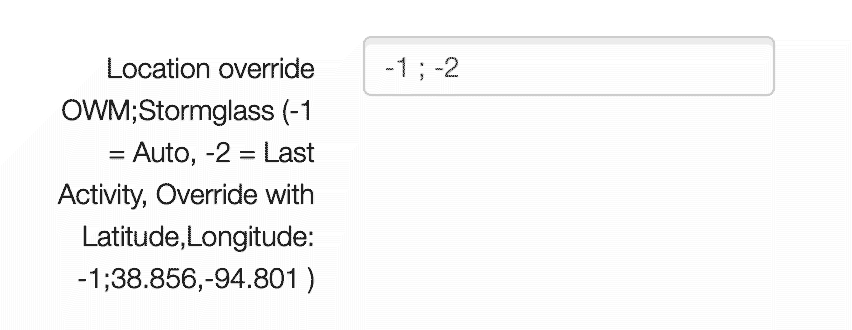
Note: The format is value1;value2 where value1 is for OWM/SunEvents and value2 is for StormGlass.io.
Make sure there are no spaces in your input.
⚠️ Important: If you enter an invalid location (incorrect coordinates or format), the watchface will automatically reset the location data to default settings (-1;-1).
More Questions:
- About Our Team
- Can I show weight training or training time?
- Can you add Training Readiness, HRV, or other metrics?
- How to change first day of the week?
- How to change the Fenix text?
- How to override my location for weather or SunEvents
- Is there a Trial period?
- Monthly bike distance shows incorrect values or 0?
- My Instinct 3 flashlight glitches?
- Weather is showing no or incorrect data
- What does "ERR: V3" mean
- What does GPS? mean
- What is the difference between Free and Pro
- Why do I see a blue "Pro function enabled"?
- Why does the Bike shortcut open Running instead?
- Why is my resting heart rate different on the watchface?
- Why is my weight slightly different from Garmin Connect?
- Will you send me a free code?