YR Weather GB
Adds weather from YR, the Norwegian Meteorological Institute, to your watchface: current conditions, a 3-day forecast, wind, air quality and more. It's free, with no account or API key needed.
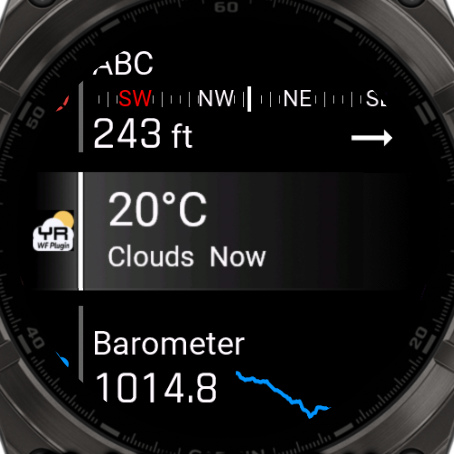
Set up the plugin
1. Install the app
Install it from the Connect IQ store, like any other watch app, and let it sync to your watch.
2. Open the app once on your watch
Open YR Weather GB from your watch's app list. It has to be started at least once before it shows weather. After that, it keeps updating by itself. The first weather can take a few minutes. After restarting your watch, scroll through your glances once. That makes it get weather again.
Connect it to your watchface
There is nothing to pair and no code to enter. Once the plugin has weather, your watchface can read it from the watch. You only choose which fields to show:
1. Open the watchface settings on your watch
Go to Menu → Watch Face → your watchface and choose Customize, edit, configure or the edit icon. The exact path and wording are slightly different on every model.
2. Check that the plugin is found
Open Plugins. YR Weather GB should say Installed.
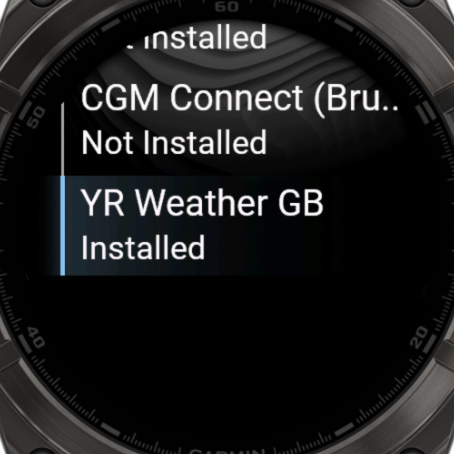
3. Choose a field
- Go back and open Data.
- Choose Pick on screen and select a box on the watchface, or choose a field from the list.
- Choose the Data row, then Plugins, then YR Weather - GB.
- Choose the weather you want to show, like Current Temperature.
Do the same for every other field you want to use for weather.
4. Set your units
Choose Data Options for the field to set its temperature, wind or pressure unit. The unit settings in the plugin's own settings don't change what the watchface shows.
These steps are for watchfaces with their settings on the watch, like No Excuses. On other watchfaces and apps, see Use it with other apps.
Available fields
The app itself is free. Fields marked PRO need the PRO version of your watchface. YR doesn't provide visibility, so there is no Visibility field.
Temperature
| Field | PRO | Notes |
|---|---|---|
| Current Temperature | – | |
| Max/Min Temp | – | Today's high and low in one field. |
| Feels Like Temp | – | An estimate. YR has no official feels-like value. |
| Temp Max, Temp Min | PRO | Today's high and low as separate fields. |
| Dew Point | PRO | |
| Temp Tomorrow, Temp Day after Tomorrow | PRO | |
| Max/Min Tomorrow, Max/Min day after Tomorrow | PRO |
Conditions, wind and rain
| Field | PRO | Notes |
|---|---|---|
| Weather Description Long | – | For example "light rain". English only. |
| Weather Description Short | PRO | For example "Rain". English only. |
| Humidity | PRO | |
| Pressure | PRO | |
| Windspeed, Wind Degrees, Wind Gust | PRO | YR sometimes has no wind gust for a location. |
| Rain 1h Volume, Snow 1h Volume | PRO | YR gives one amount, used for rain or snow. |
| Cloud Cover | PRO | |
| Precipitation % | PRO | Only available in the Nordic countries. Elsewhere it shows --. |
| UV Index (UVI) | PRO |
Air quality (turn on "Air quality" in the plugin settings first)
| Field | PRO | Notes |
|---|---|---|
| Air Quality Index (AQI) | PRO | From 1 to 5, from Open-Meteo. |
| AQI description | PRO | Good, Fair, Moderate, Poor or Very Poor. |
| AQI - PM2.5, PM10, CO | PRO |
Location and updates
| Field | PRO | Notes |
|---|---|---|
| City Name | PRO | Needs "Show location" on in the plugin settings. It is on by default. |
| Update Time | – | When the weather was last updated. |
Plugin settings
You don't need to change anything. If you want to, go to Devices → your watch → My Apps → YR Weather GB → Settings in the Connect IQ app on your phone, or use the menu of the app on your watch.
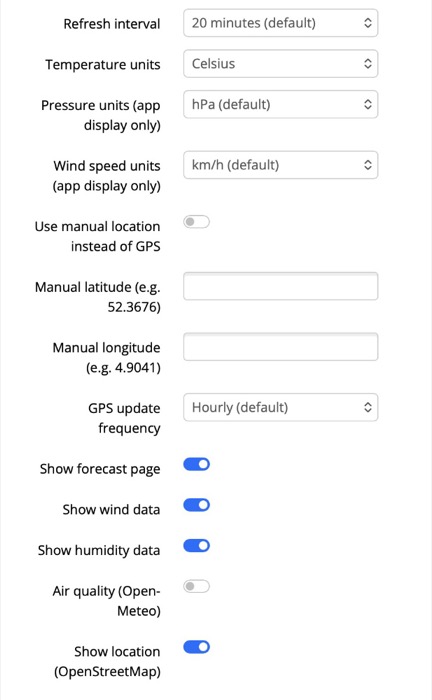
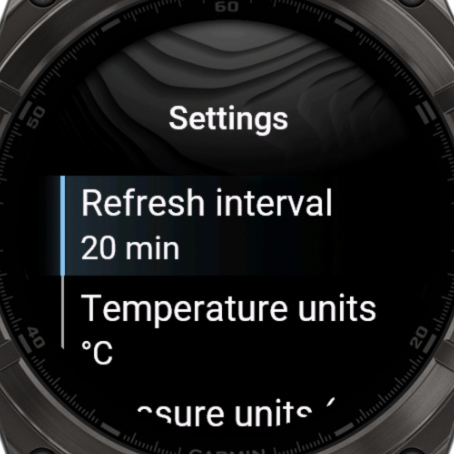
| Setting | Default | What it does |
|---|---|---|
| Refresh interval | 20 minutes | How often to get new weather: 10, 15, 20, 30 or 60 minutes. More often uses more battery. |
| Use manual location instead of GPS | Off | Always show the weather for one place. |
| Manual latitude, Manual longitude | Empty | The place to use, for example 52.3676 and 4.9041. |
| GPS update frequency | Hourly | How often to check your location: every fetch, hourly, every 6 hours or daily. Less often saves battery. |
| Show forecast page, Show wind data, Show humidity data | On | Turn off what you don't use. Fields that need it will show --. |
| Air quality (Open-Meteo) | Off | Turn this on to use the air quality fields. |
| Show location (OpenStreetMap) | On | Finds the place name for the City Name field. |
| Temperature units, Pressure units, Wind speed units | Celsius, hPa, km/h | For the plugin's own screens and the Temperature complication. To change a field on the watchface, use its Data Options. |
Need coordinates? Use the Location Lookup tool.
Use it with other apps
Other watchfaces and apps that support complications can show the Temperature, Condition and Air Quality values.
In the list, these end in _owmgb for OWM Weather GB and _yrgb for YR Weather GB, so you can tell the two apart.
On my Classic watchfaces, you can do this with custom complications.
Custom complications don't have their own icon or data formatting. Want an official implementation in your watchface or app? Contact me at obrrZIN.XLN1fML1VduZ.
Troubleshooting
- No weather after restarting your watch: scroll through your glances once.
- A field shows
--: open the app on your watch and read the message there. Make sure your phone is connected. In the watchface settings, you can also try Refresh all data. See also Why is my data showing --. - The app says Waiting for GPS or No GPS fix available: start an outdoor activity with GPS for a moment, or use a manual location.
- Air quality or City Name shows
--: check that these are turned on in the plugin settings. Air quality is off by default. - Precipitation % shows
--: YR doesn't have this data outside the Nordic countries. - The Plugins menu says Not Installed: check that the app is on your watch, open it once, then choose Refresh all data in the watchface settings.
- A field shows PRO: this field needs the PRO version of your watchface. You can try it for an hour.