Fonts
Choose a font for the time and for the rest of your watchface. The hour and minute can each have their own.
Where to change fonts
- Time options: the time fonts, with a preview of your watchface.
- Advanced options → Fonts: all fonts.
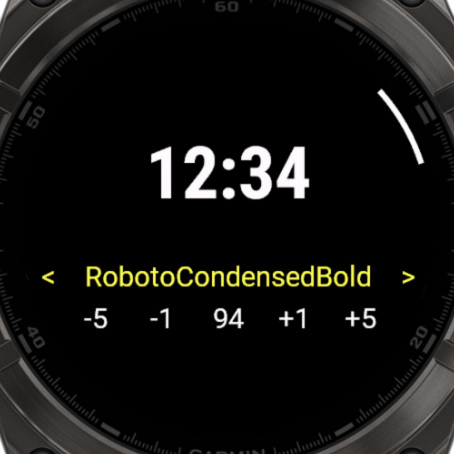
Using the font screen
| To | Touch | Buttons |
|---|---|---|
| Change the font | Tap the left or right side | UP or DOWN |
| Change the size, if the font has one | Tap -5, -1, +1 or +5 | ENTER, then UP or DOWN |
| Save | ENTER | ENTER |
| Cancel | BACK | BACK |
The fonts you can change
The exact list depends on your watchface. On No Excuses:
| Font | Used for | Watches |
|---|---|---|
| Hour Font, Minute Font | The time | All |
| Text Font | The values of the fields | All |
| Label Font | The text labels | All |
| Hour AOD Font, Minute AOD Font | The time on the always-on display | AMOLED |
| Center Text Font, Top Text Font | The values of those fields, instead of the Text Font | AMOLED |
Special choices
Some fonts follow another font, so you only have to change one:
- Same as Hour: the minutes use the Hour Font.
- Same as Text Font: uses the Text Font.
- Outlined: the always-on time uses the outlined version of your time font, if it has one.