This page is for watchfaces with their settings on the watch. Are your settings in the Connect IQ app? See the Classic version of this page.
Profiles
Save different setups of your watchface, like one for sports and one for work, and switch between them. You can have 2 profiles for free, and more with PRO.
What profiles are for
A profile is a complete setup of your watchface: its fields, colors, fonts and layout. Changing something only changes the active profile, so your other profiles stay as they are. Some ideas:
- Sports and work: training data on a bold theme for your workouts, and a calm, clean look for the office.
- Day and night: a bright theme for the day, and a dark one with fewer fields for the evening.
- Try something new: duplicate your profile and experiment on the copy. Your original stays safe.
Add a profile
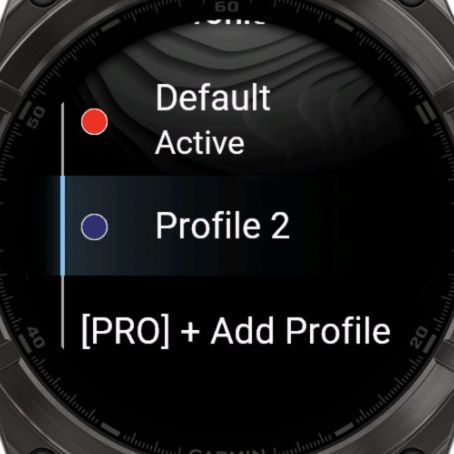
- Open the watchface settings and choose Profiles.
- Choose + Add Profile for a new one with the standard settings. Or choose a profile and then Duplicate to start from a copy.
- Choose the new profile and then Load Profile. Everything you change from now on is saved in this profile.
Manage a profile
Choose a profile in the list to see:
| Row | What it does |
|---|---|
| Load Profile | Makes this your active profile. It says Active when it already is. |
| Change name | Rename it. |
| Change Color | The color next to its name in the list for easy identification. |
| Duplicate | Makes a copy. |
| Remove | Deletes it, after asking you first. |
What is saved in a profile
| Saved per profile | The same for all profiles |
|---|---|
| Data fields, labels and their options | Touch areas and Enable touch |
| Colors and themes | First day of week and Date language |
| Fonts | Always-On Display Shift |
| Time options and layout options |
Changes are saved right away, so there's no save step. Your profiles usually stay when you reinstall the watchface, but this isn't guaranteed.
Swap between profiles
In Profiles, choose a profile and then Load Profile. The active profile says Active.
With PRO, you can also swap with a touch: set Next Profile or Previous Profile as a touch shortcut, in Advanced options → Touch options.