This page is for watchfaces with their settings on the watch. Are your settings in the Connect IQ app? See the Classic version of this page.
Free vs PRO & Activation
Most of the Free version of your watchface is free to use. PRO unlocks the rest.
What needs PRO
In the Free version:
- Data fields marked [PRO]. You can try one for an hour, then it shows PRO instead of its value.
- Touch shortcuts.
- More than 2 profiles.
- Things specific to a watchface, like extra fonts.
The two ways to get PRO
- The PRO version, through Garmin: install it from the Connect IQ store and pay through Garmin. It's fully unlocked from the start, so you won't see any [PRO] marks and you don't need a code.
- The Free version, with a code from me: buy a code on the page of your watchface on this website, and you'll get it by email. Check your spam folder if you don't see it. An unlocked Free version has exactly the same features.
Not sure which to choose? Buy through Garmin.
I can generate an unlock code for the Free version, but I can't give you access to the version you pay for through Garmin. That makes buying through Garmin the better choice.
Buying through Garmin doesn't automatically give you an unlock code. If you want one as well, email me at support.
Enter your code
Only for the Free version. The PRO version doesn't need a code.
- Make sure your phone is connected to your watch.
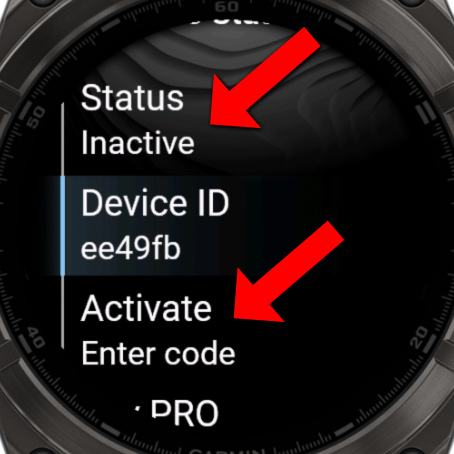
- Open the watchface settings and choose Pro Status → Activate.
- Enter your code.
- The status shows a countdown while your code is being checked, which can take a few minutes. Tap the status to refresh it, until it shows Pro Active.
If it doesn't work
If your watch can't reach the server, you can use an offline code:
- Find your Device ID in the Pro Status menu. It has 6 characters.
- Go to the Offline Key page and fill in your code, Device ID and email. You'll see your offline code right away.
- Choose Activate on your watch and enter the offline code. This doesn't need a connection.
You can also tap the status on the watch, and it offers you a QR code for the Offline Key page.
Good to know
- Lost your code? Request your unlock codes.
- Bought the PRO version through Garmin? It has no code, because it's already unlocked. If you also want a code for the Free version, email me at .
- Reset Pro status removes the activation from your watch, so you can enter a code again.