This page is for watchfaces with their settings on the watch. Are your settings in the Connect IQ app? See the Classic version of this page.
Alternative Times
Show the time in another city, or UTC, in any field on your watchface. Set a different city for every field if you like.
Set it up
- Open the watchface settings and choose Data, then the field you want to use.
- Choose Data → Date and Time → World / Alt Time.
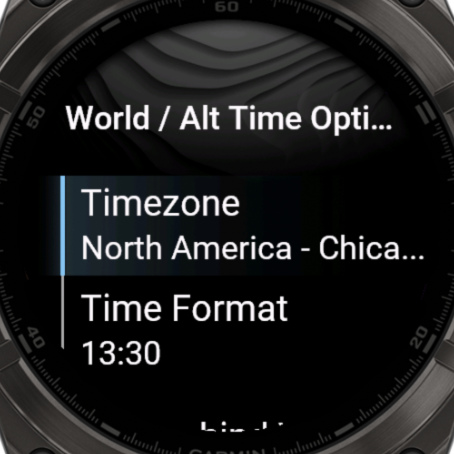
- Choose Data Options → Timezone, then a region and a city.
Daylight saving time is calculated automatically, so you never have to change anything when the clocks change.
Only need UTC?
Choose Data → Date and Time → UTC / ZULU Time. There's nothing else to set.
Options
- Time Format: System, 24h, 12h, 12h with a/p, or Customized. See Custom Date & Time Formats.
- Text behind Value: your own text after the time.
- To show which city it is, set the Label of the field to your own text.
Available cities
| Region | Cities |
|---|---|
| North America | New York, Chicago, Denver, Los Angeles, Anchorage, Honolulu, Phoenix, Toronto, Vancouver, Mexico City, Halifax, St. John's, San Juan |
| Europe | UTC / ZULU, London, Lisbon, Paris, Amsterdam, Berlin, Madrid, Rome, Stockholm, Helsinki, Athens, Reykjavik, Moscow, Istanbul, Azores, Cape Verde |
| Asia | Dubai, Mumbai, New Delhi, Bangkok, Jakarta, Singapore, Hong Kong, Beijing, Shanghai, Seoul, Tokyo, Karachi, Kathmandu, Dhaka, Yangon |
| Australia & Pacific | Perth, Adelaide, Brisbane, Sydney, Melbourne, Auckland |
| South America | Lima, Bogota, Buenos Aires, Sao Paulo, Caracas |
| Africa & Middle East | Lagos, Cairo, Johannesburg, Nairobi, Riyadh, Doha |
City not listed? Choose one in the same timezone, and use the Label to show your own city name.