This page is for watchfaces with their settings on the watch. Are your settings in the Connect IQ app? See the Classic version of this page.
Start Here
On these watchfaces, all settings are on the watch itself. There are no settings for them in the Connect IQ app on your phone, and you see every change right away.
Watchfaces with their settings on the watch: No Excuses.
Open the settings
On your watch, go to Menu → Watch Face → your watchface and choose Customize, edit, configure or the edit icon. The exact path and wording are slightly different on every model.
Fenix, Epix and Forerunner
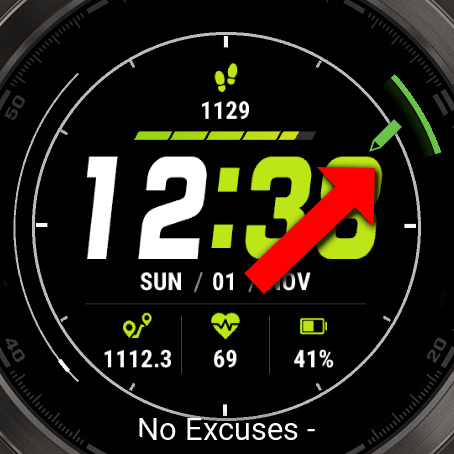
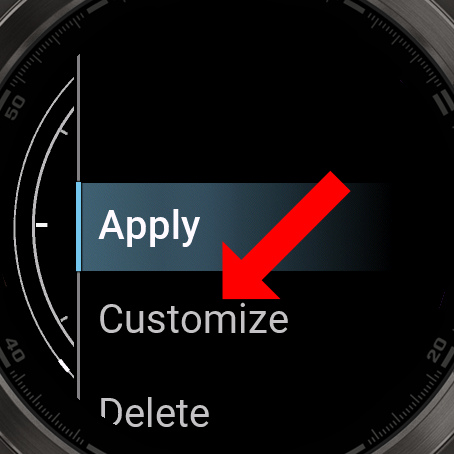
Venu and Vivoactive
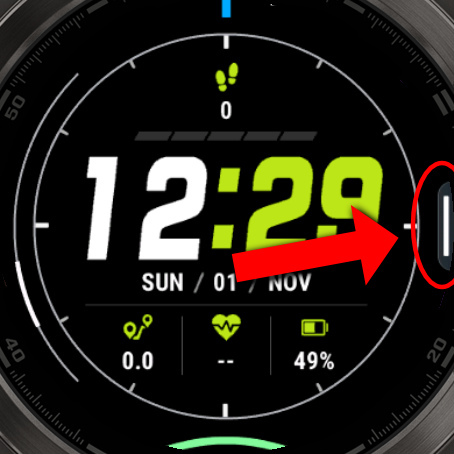
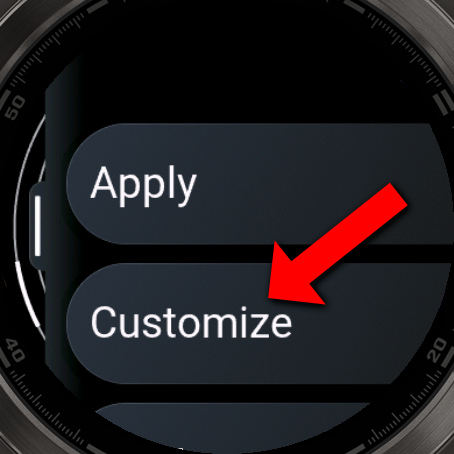
Getting around
| Touch | Buttons | |
|---|---|---|
| Move through a list | Swipe up or down | UP and DOWN |
| Choose | Tap | ENTER (top right on most watches) |
| Go back | Swipe right, or BACK | BACK |
Colors, fonts, themes and dates have their own screens, explained on their pages.
What do you want to do?
- Change what a field shows
- Apply a theme
- Change the fonts
- Save different setups in profiles
- Set up your own date or time format
- Show the time in another city
- Count down to a date
- Change how often a field updates
- Show dates in English, or change the first day of the week
- Unlock PRO
- See everything in the settings menu