LibreLink - Installation & Setup
Follow these three simple steps to get the CGM+ App up and running on your Garmin device.
⚡ Quick Setup Guide
Enable LibreLinkUp
- • Open Libre (1/2/3) app
- • Under Connected apps, add LibreLinkUp
- • Add connection
- • Save your credentials for LibreLinkUp
Configure App
- • Open Garmin Connect IQ
- • Find app in My Devices
- • Select Libre / LibreLinkUp as CGM System
- • Enter LibreLinkUp credentials
- • Save
⏱️ Total time: 5-10 minutes • 📖 See detailed steps below
Step 1: Install the CGM App
- Open the Garmin Connect IQ Store on your phone or visit apps.garmin.com
- Search for "CGM+ GB"
- Tap Download or Install
- Wait for the app to sync to your Garmin device (this may take a few minutes)
Note: Make sure your Garmin device is connected to your phone via Bluetooth and the Garmin Connect app is running during installation. If the installation gets stuck, restart the Garmin IQ app on your phone.
Step 2: Enable LibreLinkUp
The CGM+ App requires LibreLinkUp to be enabled. This allows the app to fetch your glucose data from Abbott's LibreLink servers.
Enable LibreLinkUp
- Open the Libre app on your smartphone. THis works with Libre 1, 2 and 3 systems
- Make sure you're logged in and your sensor is connected
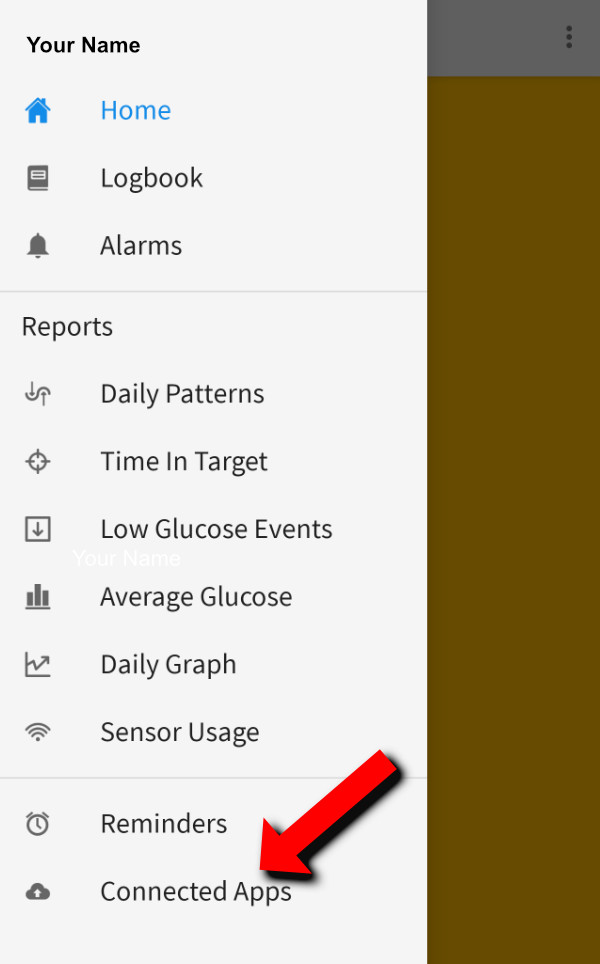
- Tap the menu icon (three horizontal lines) in the top left
- Tap "Connected Apps"
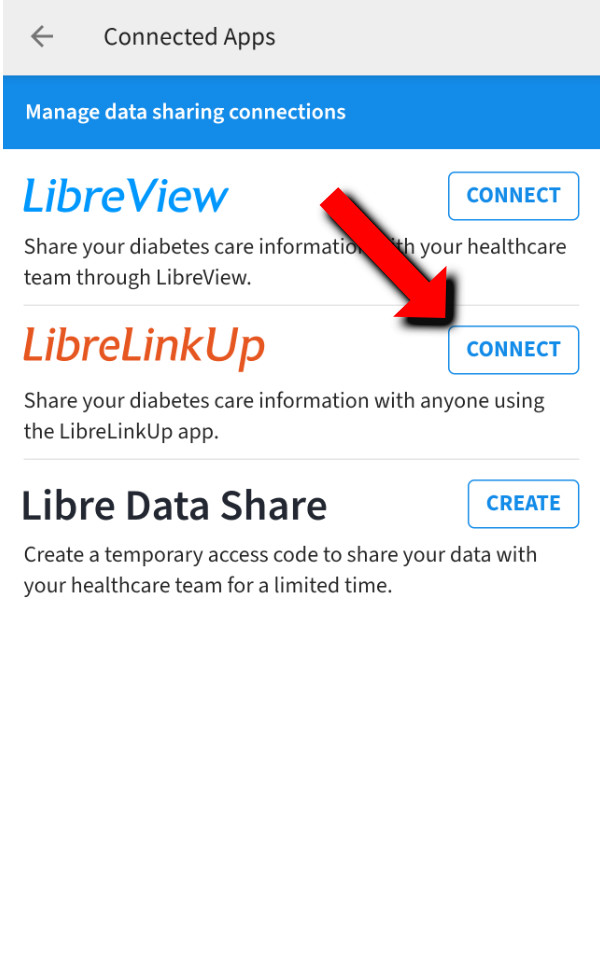
- Press "Connect" under "LibreLinkUp"
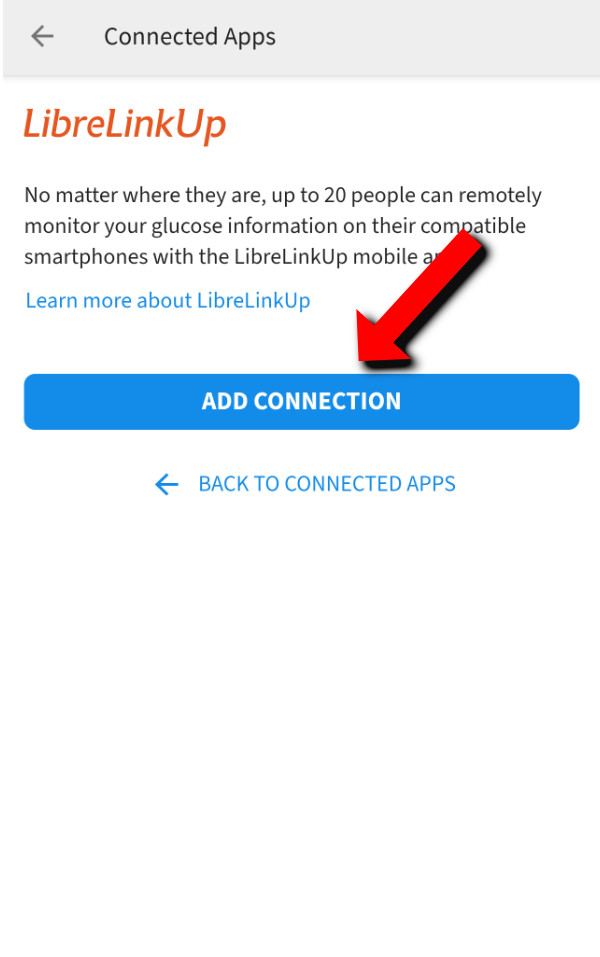
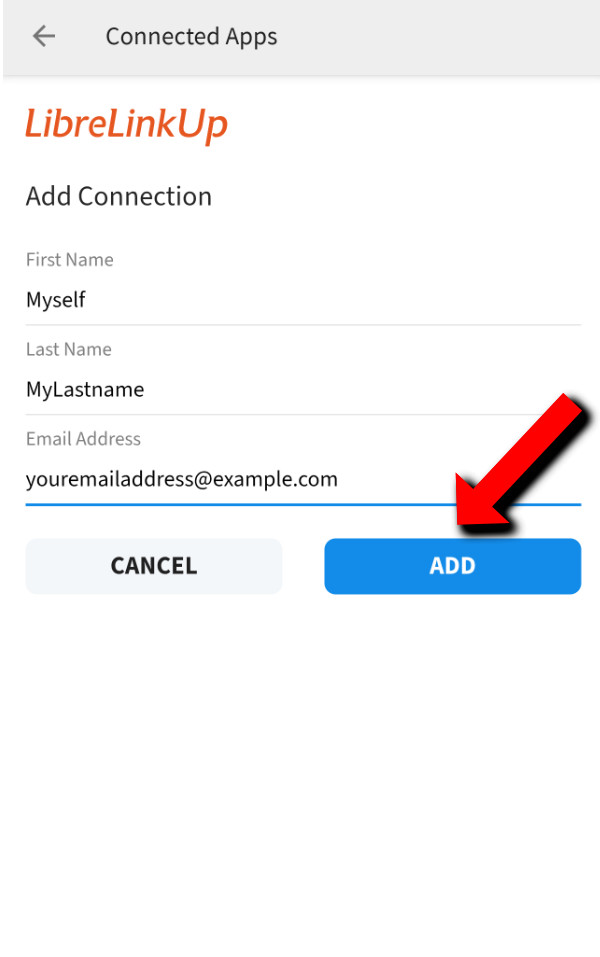
- Add a connection with your own email-address (sharing the data with yourself)
- Download, install and open the LibreLinkUp app on your phone (Android / Apple)
- Log in or create an account with the same email address your shared with
- Accept the inventation
- Remember your LibreLinkUp email and password - you'll need these for the Garmin app
⚠️ Important: Make sure you're using LibreLinkUp credentials (not your main LibreLink account). These are separate accounts.
📖 Note: For more detailed information, see the official LibreLinkUp getting started guide.
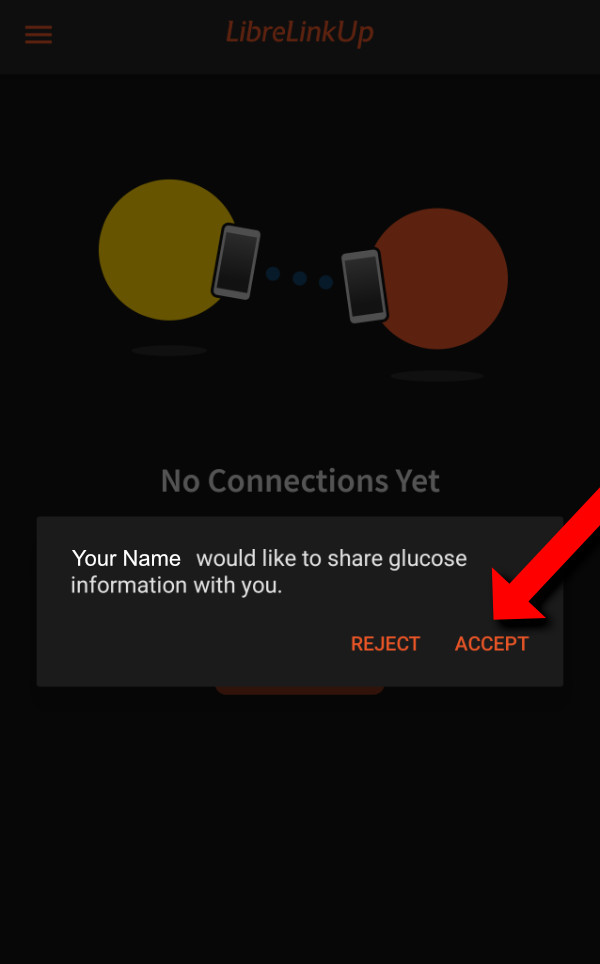
Step 3: Enter LibreLinkUp Credentials in the CGM+ GB settings
Now you need to configure the CGM+ App with your LibreLinkUp credentials.
- Open the Garmin Connect IQ app on your phone
- Tap My Devices at the bottom
- Select your Garmin watch from the list
- Tap Apps
- Find and tap CGM+ GB
- Tap Settings
- Select Libre / LibreLinkUp under "CGM System"
- Enter your LibreLinkUp email in "Username / Url"
- Enter your LibreLinkUp password in "Password / Token"
- Tap Save
- Sync your settings to your watch by pulling down to refresh in Garmin Connect
✓ Success! Once configured, the app will automatically connect to LibreLinkUp and start displaying your glucose data
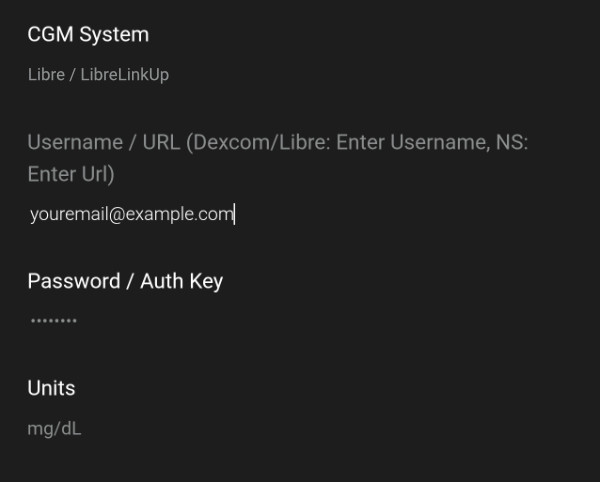
LibreLinkUp configuration in the app settings
Troubleshooting
If you're not seeing glucose data after 10 minutes:
- Verify you're using your LibreLinkUp credentials (not your main LibreLink account)
- Double-check your email and password are correct
- Verify you selected the correct CGM System (Libre)
- Ensure LibreLinkUp is enabled in your LibreLink app and the inventation is accepted
- Make sure your sensor is active and reading in the Libre app
- Check that your phone has an internet connection
- Try restarting the Garmin Connect app and re-syncing
See the Error Codes page for detailed troubleshooting steps.
Next Step: Learn how to display CGM data on your watchface.
⚠️ Important Disclaimer
- NOT FOR MEDICAL DECISIONS: This app is for informational purposes only and should NOT be used to make medical decisions.
- Always verify readings: Confirm glucose values with your official Dexcom receiver or app before taking action.
- Emergency situations: In case of extreme glucose levels or medical emergencies, use your primary CGM device.
- Delayed data: Readings may be delayed by several minutes due to how often the app can sync.
- No liability: The developer assumes no responsibility for health outcomes related to the use of this app.
- Not affiliated: This app is not approved by, endorsed by, or affiliated with Dexcom, Abbott (Libre), or any other medical device company.