

Black Friday: every watchface 30% off, and new bundles with a Lifetime Pass for $24.99 →

Settings

All settings are in the game itself, on your watch. There is nothing to set in the Connect IQ app on your phone. The game doesn't know you have a phone.

Menu path: Main menu > SETTINGS

There are five settings. Press START on a row, or tap it, to switch it to the next option. A change is saved right away. Five settings is not a lot. I wanted one part of this game to be simple.
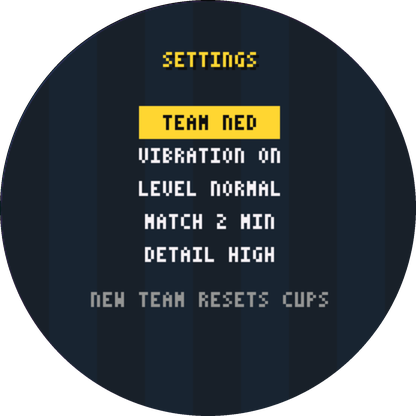
The Settings menu with the rows TEAM, VIBRATION, LEVEL, MATCH and DETAIL
Row Choices What it changes
TEAM Any of the 32 countries Opens the country picker. Pick a country and you go back to the main menu. Press BACK to keep the team you had. You play as this team in every mode. Changing your team deletes your saved Tournament and World Championship, and the next ones start from the beginning. Picking the same team again changes nothing.
VIBRATION ON or OFF With ON, the watch buzzes at goals, tackles, saves, half time and full time. Watch Mode never buzzes. It starts on ON. Turn it OFF if you play in meetings.
LEVEL EASY, NORMAL or HARD How good the computer team is. On a higher level their players run faster and their keeper is better. It is used in Quick Game, Tournament and World Championship. It starts on NORMAL. There is no level that makes the controls easier. People have asked.
MATCH 30 SEC, 1, 2, 4 or 6 MIN How long a match takes, in real time. It is used in Quick Game, Tournament and World Championship. It starts on 2 MIN. Pick 30 SEC if you want to get the losing over with.
DETAIL HIGH or LOW How much the game draws on the screen. It starts on HIGH. More about this below.

You can also change LEVEL and MATCH on the Quick Game screen. They're the same two settings, so changing them there changes them here.

A few other choices are saved on their own screens: your Lineup, your Fake a Game setup and Commentary on or off.

DETAIL: HIGH or LOW

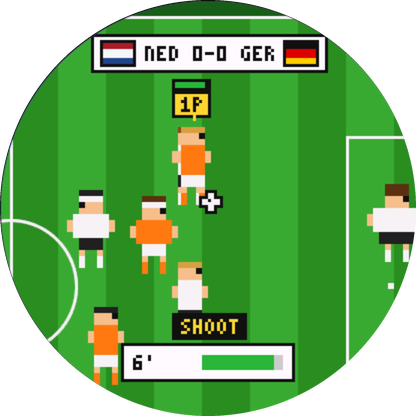
Here is the same moment of a match with DETAIL on HIGH and on LOW. If you can't see the difference, look at the net. If you still can't see it, you now understand the graphics.
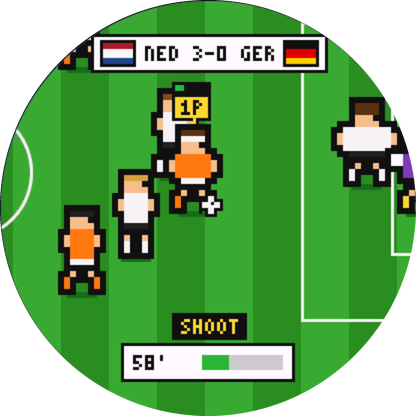
DETAIL HIGH: players with black outlines and shadows, and a net with a mesh
DETAIL LOW: the same moment without outlines, without shadows and with a plain net
HIGH LOW
Players Black outline around each player No outline
Shadows A shadow under each player and under the ball No shadows
The goal net A net with a mesh Only the back and the sides of the net
Messages, such as GOAL! With a shadow behind the text Without a shadow

When should you use LOW? Only when the game feels slow or jumpy on your watch. On LOW there is less to draw, so an older watch runs the game a little more smoothly. If the game runs fine, leave it on HIGH. HIGH looks better. Not a lot better, but I'll take what I can get.

On black and white watches the players never have outlines or shadows. There, LOW only changes the net and the messages.