 Get it on Connect IQ
Wrist Soccer '86
A soccer game for your Garmin watch. You pick a country and play a quick match, a tournament or a whole World Championship. I made it in the style of 1986, which is a polite way of saying it looks terrible and is hard to control. You have been warned, and you are still here, so let's go.
What the game is
You look at the pitch from the side. Each team has 5 players: a keeper and 4 in the field. There are 32 national teams to choose from. Every player is thirteen pixels tall and the ball is a plus sign. If you can't tell the players apart, that's normal. I made them and I can't either.
You control one player at a time. He's the one with the yellow 1P tag above his head. He runs by himself: toward the goal when he has the ball, and toward the ball when he doesn't. All you do is steer him and decide when to shoot, pass or tackle. That sounds easy. It isn't, and that's not your fault. It's mine.
The rest of the manual is on three more pages. Yes, a watch game with a four-page manual. I got carried away.
- Controls: what each button and touch gesture does on your kind of watch.
- Game modes: training, quick game, tournament, World Championship, penalties and Watch Mode.
- Settings: team, vibration, level, match length and detail.
First start: pick your country
The first time you open the game, it asks which country you want to play for. You see the flag, the name and a row of stars. More stars means a stronger team. Under that are the team's shirts. The players don't have names. They're thirteen pixels tall, so there was no room on the shirt anyway.
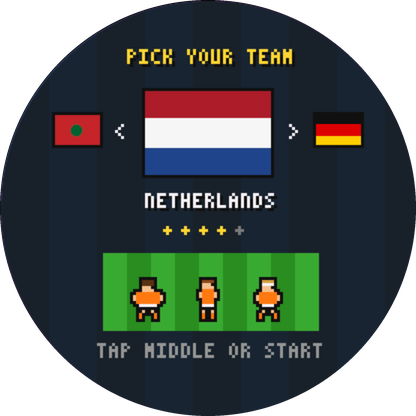
| Watch | Change the country | Pick the country |
|---|---|---|
| With buttons | UP or DOWN | START |
| With a touch screen | Tap the left or right side of the screen, or swipe | Tap the middle of the screen |
You can change your country later in Settings. Be careful with that: changing it throws away the Tournament and World Championship you were playing. So pick a team you can put up with for at least one cup.
The main menu
This is where you choose what to play. Move through the list with UP and DOWN, or by swiping. Press START or tap a row to open it. BACK closes the game, in case you've seen enough.
Your country is shown under the list. Above the list is a line of text that changes every few seconds. Those are my jokes. Sorry about those too.
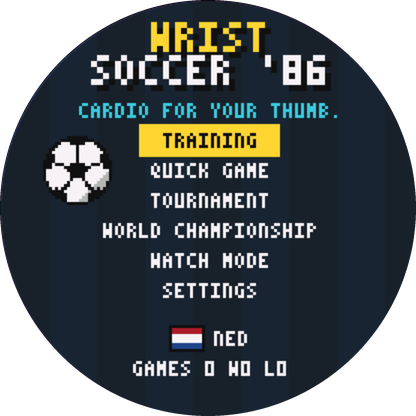
| Row | What it does |
|---|---|
| TRAINING | Five drills: shooting, passing, slalom, penalties and the Finger Trainer. Your best scores are saved. More |
| QUICK GAME | One match. You choose the opponent, the level and the length. More |
| TOURNAMENT | A knockout cup with 8 teams. Lose once and you're out. More |
| WORLD CHAMPIONSHIP | A cup with 32 teams: first a group, then knockout rounds. More |
| WATCH MODE | The watch plays both teams and you only watch, so you can't lose. Not on all watches, see below. More |
| SETTINGS | Team, vibration, level, match length and detail. More |
| GAMES 12 W7 L3 | Your record: games played, won and lost. Open it to see your last 10 games. More |
The green dot. A small green dot to the right of TOURNAMENT or WORLD CHAMPIONSHIP means you have a cup going. It appears as soon as you open a cup. The game saves it after every match, so you can stop and come back later. The dot is tiny. So is everything else in this game, so at least it fits in. More about saving.
The game starts playing by itself. If you leave the main menu alone for 30 seconds, the watch starts a match and plays both teams. Nothing is broken. It just got tired of waiting for you. How to stop it.
"Unplayable without touch". On a watch without a touch screen, the line above the list sometimes claims the game is unplayable without touch. That's one of my jokes. You can play the whole game on the buttons. To be fair, it's not much more playable with touch.
The glance
The glance is the small card you see when you scroll through the widgets on your watch. It shows the name of the game and one line with your results: games played (P), won (W) and lost (L), and then your last match. For example: P12 W7 L3 W 3-1 V ITA. Before your first match there is nothing to brag about, so it shows a short text instead.
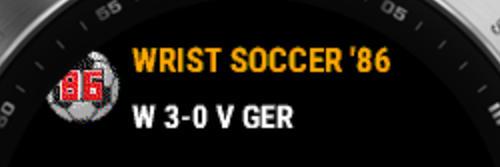
Only matches you finish in Quick Game, Tournament and World Championship are counted. Drills and Watch Mode are not. A match you quit from the pause menu isn't counted either. I'm not saying you should quit when you're 4-0 down. I'm only saying nobody would know.
Not every watch can show a glance for a game. Watches from before about 2020 can't, even if they run the full game. Examples are the fenix 5 Plus and fenix 6 Pro, the Forerunner 945, the first MARQ and Venu, and the vivoactive 4. The lighter version for older watches has no glance either. See the next part.
Older watches get a lighter version
Some older watches have very little memory for apps. The full game didn't fit on them. Yes, this game. I was surprised too. These watches get a lighter version:
Enduro, fenix 5, fenix 5S, fenix 6, fenix 6S, fenix Chronos, Forerunner 55, Forerunner 245, Forerunner 645, Forerunner 935, Venu Sq and vivoactive 3.
The Pro, Plus and Music versions of these watches have more memory and get the full game. This is what's missing in the lighter version:
- No Watch Mode. The WATCH MODE row isn't in the menu, and the game doesn't start playing by itself.
- No LAST GAMES list. The bottom row of the menu still shows your totals, but you can't open it.
- No glance.
Everything else is there: Training, Quick Game, Tournament, World Championship, the Lineup and Settings. You don't have to choose a version yourself. The Connect IQ store gives your watch the right one.
Different kinds of watch screen
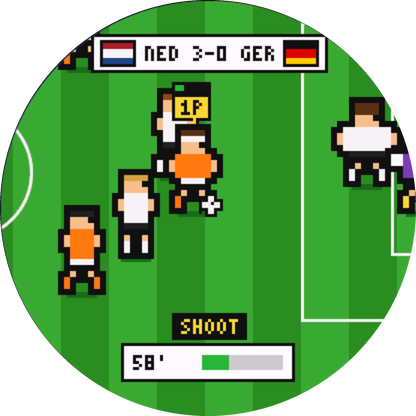
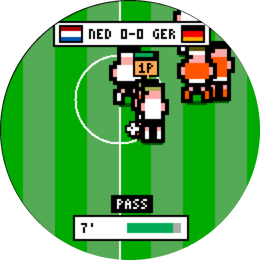
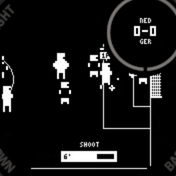
Most Garmin watches have one of three kinds of screen, and the game looks a little different on each. Here is the same moment of a match on all three. No, none of them makes it look good.
| Screen | Watches, for example | What you see |
|---|---|---|
| AMOLED | epix, Venu, vivoactive 5, Forerunner 265, Instinct 3 AMOLED | Full colour on a bright screen. This is the best the game will ever look. I know. |
| Colour MIP | fenix 7, Forerunner 255, Enduro | The same colours, a bit less bright. Easy to read in full sunlight, which is not always a good thing here. |
| 2 colours | Instinct 3 Solar, Instinct E | Black and white only. More about that below. |
The black and white version. On a watch with 2 colours, the pitch is black with white lines. Your players are white. The other team wears black shirts. There are no shadows and no outlines. A penalty shootout uses shapes where the other watches use colours: a block is a goal, a dash is a miss, and a small dot is a kick that hasn't been taken yet.
I think the game looks better this way. With only two colours there is less of it to look at.