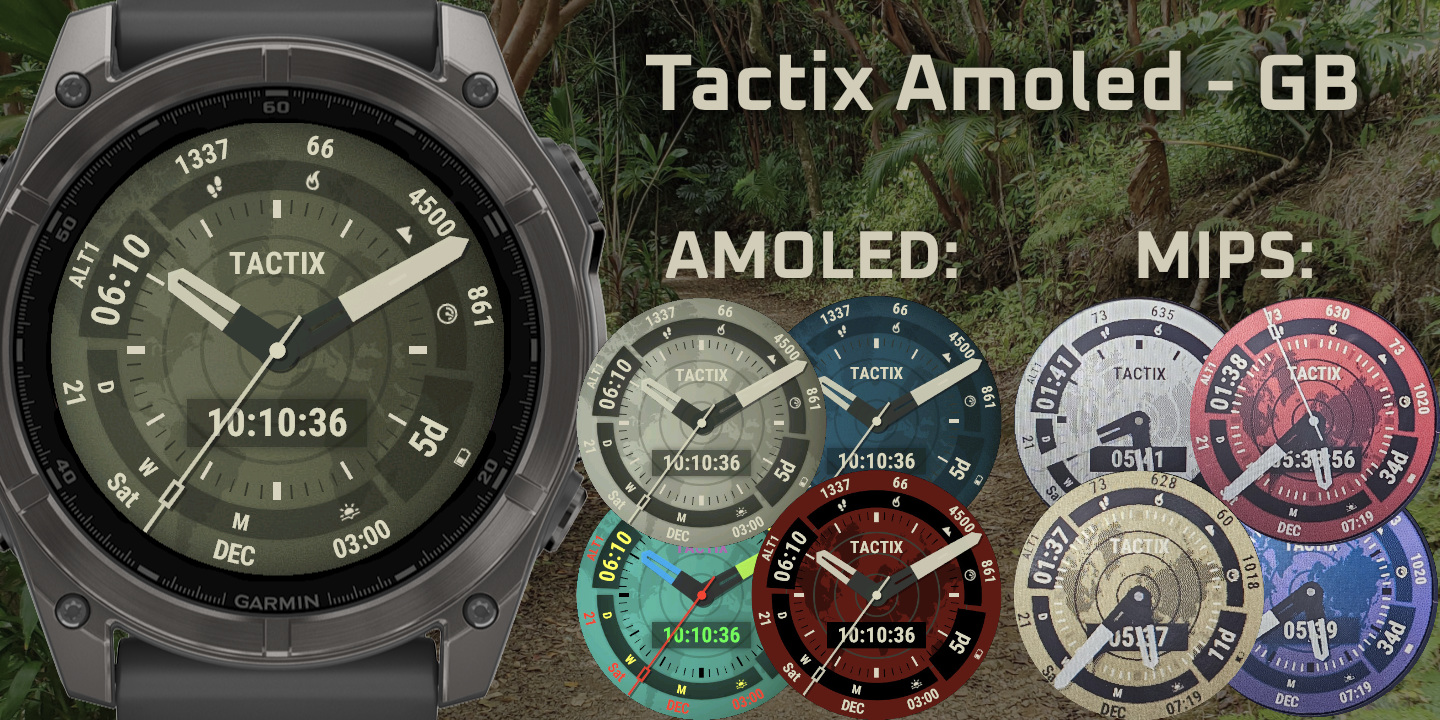
Tactix Amoled
Download Options
 Free Version
Purchase Watchface - $4.99






Tactix Amoled - Changelog
Version 26.09.25
- Added support for the Fenix9PRO 51mm
Version 26.08.22
- Added most Fenix 9 devices
- Added Event countdown
- Added OWM weather description Short to the options
- Added support for OWM One call api 4.0
- Updated moon icons for better visibility on MIP
- Updated icon for Hydration apps
- Fixed Body battery not showing percentage when percentage is enabled
Version 26.08.11
- Added sleep score on supported devices
- Added support for OWM One Call 4.0
- Added support for FR70 and 170
Version 26.05.01
- Fixed issue with upcoming sunset as marker
Version 26.04.30
- Added full CGM+ support
- Fix for sport duration and distance
- OWM optimisations and ensuring it keeps updating
- Added Alternative timezone options for DST/Standard time
- Fix for ISO week number being off sometimes
- Added Calendar week number (use %V in custom date, or pick the option in the settings)
- Fixed sunset/ event/ dusk, dawn being off by a few minutes in some cases
- Fixed wording for sun events to use more commonly used words
- Fixed Sport week 7 day and week flipped
- Fixed weather update time marker showing wrong time
- Added Sport 1 number of activities datafields for 7 day, week, today, 30 day and Month
Version 26.01.15
- Added Stormglass Tides, water temp etc
- Added BMI and Training Effect
- Added Sport 1/2 training time (so you can show the workout times in addition to distance)
- Added support for D2 Mach2
- Added location override so you can put in a manual location
Version 25.10.20
- Added support for Fenix8Pro, Venu4
- Fixed icons disappearing after loading a preset
- Fixed touch presets trying to load empty presets
- Fixed icons appearing a second late after getting back from aod
- Minor bugfixes
Version 25.06.05
- Fix for presets not loading correctly when using touch
- Added Timer field
Version 0.09
- Added many data and label fields
- Added support for FR970, 570 and VA6
- minor bugfixes
Version 0.08
- More bugfixes
- Replaced battery icon
- Added min/max HR
- Added Moon age percentage
Version 0.07
- Bugfixes
Version 0.06
- Tons of new fields and features
- Fixed OWM not getting updated after first data pull on some devices
- removed Weight rounded, replaced by weight with one decimal
- Fixed weather not updating
- Fixed weekly data adding an extra day
- Added support for Tactix 8
Version 0.05
- Fixed crash when pausing activity and having distance field selected on the face
- fixed crash when setting a broken goal in the settings
- Fixed Altitude not following system units
- Fixed steps to go progress circle
- Added support for progress in custom complications
- Added Hydration PRO support
- Added Better CGM support (bruder Jacob CGM app). Let me know what other apps that have complication support you want to use. See the FAQ to set this up.
- Cached weather data and complications. Old data will show with a star, to indicate it's older than 10 minutes.
- Fixed DND icon
Version 0.04
- Added Status icon option for top or bottom
- Units will now be added when combined length is less than 4 instead of 3 (adding K to rounded steps)
- Fixed presets naming,presets save all settings, not just colors :-)
Version 0.03
- Fix for background disappearing after a while
- Fix for saving while watch is inactive doesnt change the background
Version 0.02
- fixed issue with background disappearing after doing some activities on the watch
Version 0.01
A watchface inspired by the Tactix 7 Delta Watchface.
Fully optimized for MIP devices, but great on AMOLED as well.
Hundreds of datafields to pick from. 3 handstyles and fully customizeable.
Try before you buy: https://apps.garmin.com/apps/f2a713a9-6159-4f59-8d2c-e85b6b02910c
Make sure to try out the face before you buy it with the link above.
** Please don't use the review section to report bugs or ask questions. Use the "Contact developer" button, so I can get back to you right away. **
FAQ: https://ko-fi.com/post/FAQ--General-question-for-most-watchfaces-X8X516K3IQ
FR165: This device is only partly supported. Most themes don't look like the images, only the main theme is accurate and some AOD options might not work.
FAQ:
What are the different colors?
Most of the colors are numbered. Check out this post with all the colors:
https://ko-fi.com/post/MIPS-Color-list-W7W21345E9
AMOLED:
Always on display (AOD) turns off?
Garmin only allows a max of 10% brightness, or 10% pixels lid up in AOD mode, to prevent burn-in and battery drain. If it exceeds either of those values, the screen will turn off.
This watchface has a lot of options to go well over that limit, so in order to stop your screen from going off, there are some options:
AOD DIM: This dims your screen by the percentage you set, allowing you to stay under the 10% max brightness. But when having a white background set, this might not be enough.
Set this to "Automatic" to automatically guess the amount of dimming you need based on your background color and some settings. If it guesses it needs more than 70% DIM, it will switch to the night background, otherwise it will dim the amount it thinks it needs. I call it "guess" because with the amount of options, it can't be accurate in all cases, but this will work for most.
AOD BACKGROUND: You can set the background behaviour in AOD mode. By default is goes to Night background. Take caution when setting it to "FULL", bright background colors easily go over the max 10% brightness, so set your AOD DIM accordingly.