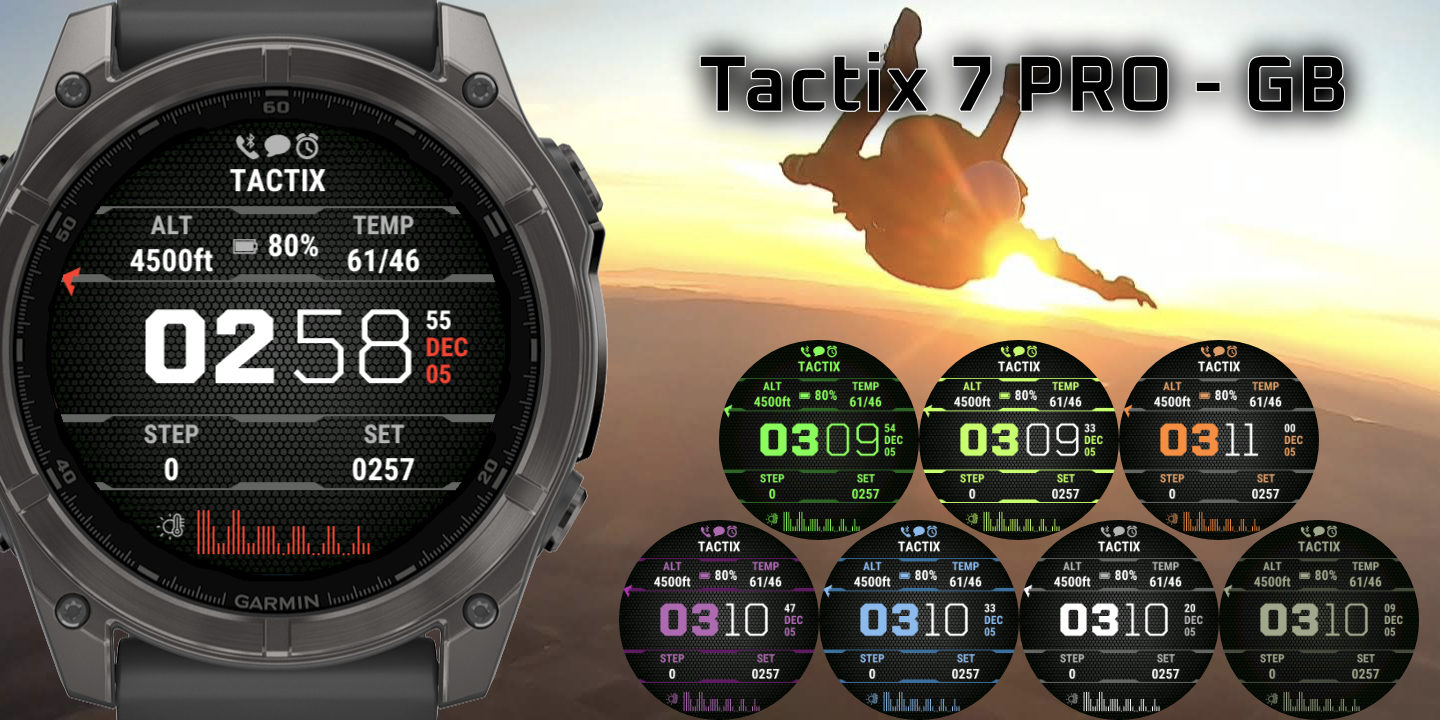
Tactix 7
Download Options
 Free Version
Purchase Watchface - $3.99






Tactix 7 - Changelog
Version 26.08.28
- Added support for Fenix 9 models
- Added Event countdown
- Added OWM weather description Short to the options
- Added support for OWM One call api 4.0
- Updated moon icons for better visibility on MIP
- Updated icon for Hydration apps
Version 26.05.14
- Added FR70 anf FR170 as supported devices
- Fixed issue with upcoming sunset as marker
- Fix for sport duration and distance
- OWM optimisations and ensuring it keeps updating
- Added Alternative timezone options for DST/Standard time
- Fix for ISO week number being off sometimes
- Added Calendar week number (use %V in custom date, or pick the option in the settings)
- Fixed sunset/ event/ dusk, dawn being off by a few minutes in some cases
- Fixed wording for sun events to use more commonly used words
- Fixed Sport week 7 day and week flipped
- Fixed weather update time marker showing wrong time
- Added Sport 1 number of activities datafields for 7 day, week, today, 30 day and Month
Version 26.02.04
- Added support for CGM+ Glucose Monitor Dexcom, Libre, xDrip, Nightscout ( https://apps-developer.garmin.com/apps/9521d9b2-8dea-4d05-b311-f62b884844c2 )
- Fixed issue with custom datestring (thank you Yanis!)
- General bugfixes
Version 25.12.18
- Fixed pressure
- General bugfixes
Version 25.11.03
- Fix for Always on seconds. Thanks Giulio for the report!
Version 25.10.24
- Fix for minutes getting cut off since last update
- Fixed icon issue on Fenix7
- Added support for Mach2
Version 25.10.20
- Fix for minutes getting cut off since last update
Version 25.10.19
- Added support for Fenix8pro, Venu4 and instinctCrossover
- Fixed a bunch of AOD options
- Fixed minutes getting cut off even if left fields are not used
- Fixed status icons not updating
Version 0.11
- Added support for FR970 fr570, descentg2, vivoactive6
- Minor bugfixes
Version 0.10
- Fixed a crash caused by an activityinfo chart field
Version 0.09
- Added support for Tactix8
- General new features and bugfixes
Version 0.08
- Fixed barometer showing wrong data
- Fix for unreliable complication data after last Firmware upgrades
- Fixed weekly/ monthly data. Faster calculation, and using same days as garmin uses in garmin connect
- Fixed crash on Forerunners with Beta software 22.14
- Fixed Time to next sun event still having 30 minutes offset
- Fixed sunrise showing current day before midnight
- Fixed progress circles for sunset/rise
- Fixed alignment when hiding leading zero
- Added Approach S50 and Instinct3 support
- Fixed pressure
- Fixed time to sunevent missing 30 minutes
- Added Hydrate+
- Fixed distance week/month nut adding up correctly on some devices
- Replaced BT icon and Fog icon and fixed some arrow icons
- Added fallback for body battery. If last measurement is empty, use previous measurement
- Steps rounded now always shows a K when above 1000
- Fixed sensorpressure being the same as pressure
- Better AOD support for fr165
- Fixed wind direction not showing when direction is 360 deg
- Fixed OWM pressure / clouds and pop calculation errors
- Fixed issues when setting gap size bigger than step size
- Set background color of time to transparent so you can overlap the numbers (not for fr165)
- Fixed wind gust for OWM
- Added Baro Pressure arrows for sensor and OWM
- Switched to OWM One call API for these new fields (You need a ONE Call 3.0 API key to use these, see FAQ):
- Added OWM UVI index
- Added OWM Dewpoint
- Added OWM Snow 1h
- Fixed OWM min and max reversed
- Added OWM temp min/max/temp for tomorrow and day after tomorrow
- Fixed down fast and up fast arrows for CGM
- Fixed getting out of reach of phone and back could freeze complications
- Added Windspeed + wind Direction
- Fixed heartrate not using min/max heartrate correctly for process bar
- Changed sunevent label to show next event (rise or set)
- Fixed active calories not using goal properly
- Fixed run/bike week from Garmin not using defined goal
- Various other small bugfixes
Version 0.07
- Fixed CGM not displaying any data
- Fixed crash when pausing activity and having distance field selected on the face
- Fixed issue with weather not displaying value when it should
- Fixed Altitude not following system units
- Fixed steps to go progress
Version 0.06
- Fix for crashes when having sunevent
- Fix for weather icons
- Fix for missing labels on sun events
Version 0.05
- Added support for progress in custom complications
- Added Hydration PRO support
- Added Better CGM support (bruder Jacob CGM app). Let me know what other apps that have complication support you want to use. See the FAQ to set this up.
- Cached weather data and complications. Old data will show with a star, to indicate it's older than 10 minutes.
- Fixel labels for sun events
Version 0.04
- Added steps week rounded
- Added pressure with 2 decimals
- Fixed DND icon
- All colors are numbered now, so you can find them a lot easier using the palette in the FAQ
Version 0.03
- Removed BPM from heartrate
- Fixed getting back from Menu shows blank screen on Fenix 8 Solar
- Added Small and Large fonts
- Added Roboto Italics and Roboto Italics Outlined fonts
Version 0.02
- Fixed left/right offset mixed up
- Added weather to markers, including working windspeed etc.
- Added time to recovery to markers in two different ways
- Added Dew Point for OWM and Garmin weather
How to set up the CGM app?
Currently the only fully supported app is the app from Bruder Jacob, found here: https://apps.garmin.com/apps/034a3784-b27f-4f2a-a109-67413a5f4f83
Other apps might work as well, follow these instructions to set it up:
https://ko-fi.com/post/How-to-show-data-from-Other-apps-on-the-watchface-Q5Q8180KZT
Let me know if you have a working CGM app that you want full support for, and I'll add it in as well.
Step 1: Install the CGM app from Bruder Jacob: https://apps.garmin.com/apps/034a3784-b27f-4f2a-a109-67413a5f4f83
Step 2: Follow all the setup steps througoly as described here: https://apps.garmin.com/apps/034a3784-b27f-4f2a-a109-67413a5f4f83
Step 3: Make sure to enable setting "Enable Complications for external apps":
Step 4: In the watchface settings on the IQ app, select "CGM Connect value" in any field where you want to show the data. And save the settings.
Step 5: Wait at least 5 minutes for the first value to come in. It will show "--" until it gets the first datapoint, after that it will show the data.
IMPORTANT: When data shows up with a star behind it, the data is older than 10 minutes!
WARNING/IMPORTANT: THIS DATAFIELD MUST NOT BE USED TO MAKE MEDICAL DECISIONS. This field is not intended to be used to monitor your blood glucose and should not be used as such
How to show data from Other apps on the watchface?
Some apps support complications. Complications are a way to send data from one app to other apps on the watch.
All my watchfaces support these complications, and in this brief manual I will show how this can be set up.
Step 1: Install the app you want the data from.
Step 2: Open the watchface settings on your watch, and go to "Complications from Apps".
Step 3: Select the App you want to get the data from in either Complication From App 1 or 2.
If your app doesn't show up here, the app doesn't support complications. You can ask the developer of the app to publish the data to a complication.
Step 4: Open the settings of the watchface in the IQ app, and select data "App 1" for any field you want to show it (All the way on the bottom of the list)
Step 5: That's it, enjoy!
NOTE: Some apps might take a few minutes to push the data, so if the data doesn't show up right away, give it a few minutes
NOTE2: A star (*) will show behind the data, when the data is old. This can be very important, especially for CGM data. Data can be old when the app hasn't pushed any data in the last 10 minutes, or you phone hasn't been connected (and phone connection is needed to get data).